cPanel Alternatives in 2026: Web Hosting Control Panels Compared (and Why cPanel Got Expensive)
The main cPanel alternatives in 2026 fall into three groups: commercial panels you license for your own server (Plesk, DirectAdmin and the per-site Enhance), in-house panels that big hosts built instead of paying for cPanel (Hostinger's hPanel, SiteGround's Site Tools, ScalaHosting's SPanel), and free open-source panels for a VPS (HestiaCP, CyberPanel, CloudPanel, aaPanel and Virtualmin). On a shared plan you get whichever panel the host chose; on your own server you choose, and the licence bill differs by a factor of six at the low end, from DirectAdmin's $5 a month to cPanel's $29.99 for a single account.
This guide is for two kinds of reader: someone comparing shared hosts who has noticed that not all of them offer cPanel, and someone setting up a VPS who wants to know whether cPanel is still worth its licence. If you have never used a hosting panel at all, start with what cPanel is and come back. Licence prices below were read on the vendors' own pages between 9 and 12 October 2026.
What a web hosting control panel actually does
A web hosting control panel is software that turns forms and buttons into server configuration. When you add a domain, create a mailbox or issue a certificate in the panel, it writes the matching entries into the web server, the DNS zone, the mail server and the database server, which you would otherwise edit by hand over SSH. Most panels work at two levels: an administrator view that creates hosting accounts and sets their limits, and a user view for the person running a website inside one account. In cPanel's world those are WHM and cPanel; other panels use different names for the same split.
That explains why the panel matters more on some plans than others. On shared hosting you only ever see the user view, so the panel is a matter of familiarity. On a VPS or dedicated server you are the administrator, so the panel decides what your server can do, how much you pay each month for it, and how hard it will be to move away later.
Why so many people now look for cPanel alternatives
For most of its history cPanel sold flat licences: one price for a VPS and one for a dedicated server, however many accounts you hosted. In June 2019 it switched to pricing by the number of accounts. As reported by The Register at the time, the unlimited-account VPS licence at $20 a month and dedicated licence at $45 were replaced by tiers: Admin at $20 for up to 5 accounts, Pro at $30 for up to 30, and Premier at $45 for up to 100, plus $0.20 a month for each account beyond that.
On 12 October 2026, cPanel's own pricing page lists four tiers: Solo at $29.99 a month for 1 account, Admin at $35.99 for up to 5, Pro at $53.99 for up to 30, and Premier at $69.99 covering up to 100 accounts, with each account beyond that at $0.49. Paying yearly saves 8.4% on the first three; Solo, Admin and Pro are for cloud and VPS servers only, and Premier is billed monthly. Against 2019, Admin and Pro are each about 80% dearer, Premier is 56% dearer, and the charge per extra account has risen 145%.
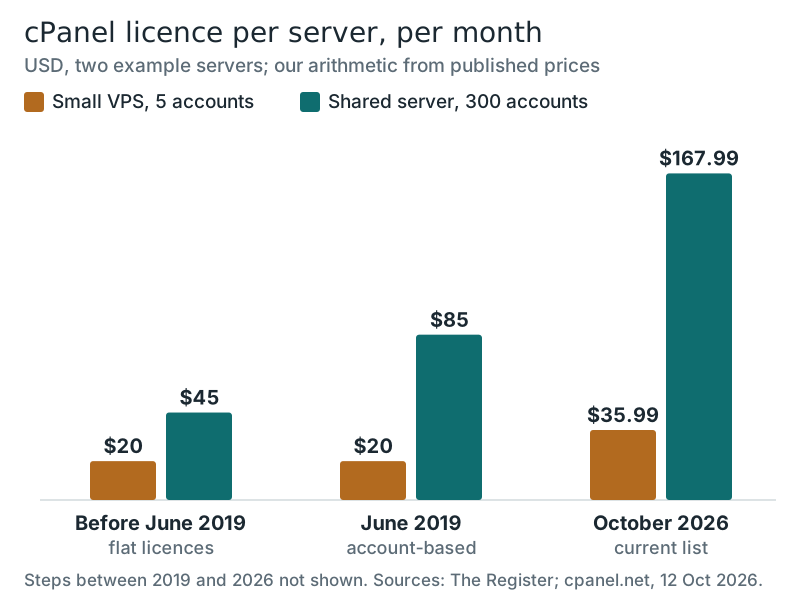
The chart shows where the change bites. A small VPS with five accounts pays $35.99 a month instead of $20. A shared hosting server packed with 300 accounts went from a flat $45 to $85 under the 2019 rules, and to $167.99 today: $69.99 for the first hundred and 200 × $0.49 for the rest. We could not confirm every price step between 2019 and 2026 from cPanel's own announcements, so the chart shows only the three points we could verify. For a budget host selling plans at a few dollars a month, a licence cost that has nearly quadrupled per server is a strong reason to build or buy something else, and several did.
The arithmetic is just as sharp for a single VPS owner. Hostinger's smallest KVM VPS renews at $11.99 a month; a cPanel Solo licence on the same server costs $29.99, more than twice the server itself.
The panels you will meet, compared
| Panel | Licence model | Price | Where you meet it |
|---|---|---|---|
| cPanel and WHM | Per server, by number of accounts | $29.99 (1 account) to $69.99 (100), plus $0.49 per extra account | Traditional shared and reseller hosts; your own VPS |
| Plesk | Per server, by number of domains | Web Admin (10 domains), Web Pro (30), Web Host (unlimited); no prices were shown on the page we read | Windows servers and many Linux VPS offers |
| DirectAdmin | Per server, by number of accounts | $5 (2 accounts), $15 (10), $29 (unlimited) | Budget hosts; your own VPS |
| Enhance | Per hosted website | $0.15 per site, $10 minimum a month | Some hosts' reseller plans, such as Hosting.com's |
| hPanel | Built in-house by Hostinger | Included with Hostinger plans | Hostinger only |
| Site Tools | Built in-house by SiteGround | Included with SiteGround plans | SiteGround only |
| SPanel | Built in-house by ScalaHosting | No licence fee for ScalaHosting clients | ScalaHosting VPS |
| HestiaCP, CyberPanel, CloudPanel | Open source or free | $0 | Your own VPS |
Plesk is the one commercial panel that also runs on Windows: its current system requirements list Windows Server 2016 through 2025, alongside Linux. That makes it the default on Windows hosting, where cPanel is not available. DirectAdmin's pricing page promises protection against arbitrary price increases, a pointed promise given the history above. Enhance takes a different approach again, charging per hosted website rather than per server, and its terms say add-on domains, aliases and subdomains are not billed separately.
In-house panels: hPanel, Site Tools and SPanel
Rather than pay per account, some of the largest shared hosts wrote their own panels. SiteGround announced Site Tools on 30 July 2019 as a replacement for cPanel and began moving existing customers that September. The reasons it gave were practical rather than financial: cPanel treats one site as primary and the rest as add-ons, which SiteGround wanted to end so that every site gets the same tools; it wanted its own access control for collaborators and white-label clients; and it wanted to add features without working inside a third-party framework. The timing, a month after cPanel's licence change, is worth noting, but SiteGround did not cite cost.
Hostinger runs its own panel, hPanel, and publishes per-plan limits for it, which makes its plans easier to size than many cPanel hosts' plans. ScalaHosting's SPanel is free to its clients, so its managed VPS plans carry no separate panel licence fee. For you as a customer, an in-house panel is usually cleaner and better integrated with the host's own caching, staging and backups. The cost shows up when you leave.
A full cPanel backup can be restored at almost any other cPanel host, settings and all. Moving out of an in-house panel means a migration tool or a manual copy. Hostinger's free migration service, for example, moves files and databases but not cron jobs, DNS records, custom SSL certificates or FTP accounts, and email has to be moved by hand. None of that is hard, but it is a checklist you would not face between two cPanel hosts. If you want the familiar panel that most tutorials are written for, Namecheap runs its shared and reseller hosting on cPanel; if you would rather have a panel built around one host's tools, Hostinger's hPanel and SiteGround's Site Tools are the two most polished examples.
Open-source web hosting control panels for a VPS
If you run your own server and are comfortable at a Linux prompt, a free panel removes the licence cost entirely. The main options, each described from its own project page:
- HestiaCP: open-source under the GPLv3 licence, community-built, and extendable with your own themes, web templates and an API.
- CyberPanel: a free panel built around the OpenLiteSpeed web server, covering websites, WordPress, email, DNS and backups.
- CloudPanel: free, built on NGINX and PHP-FPM, and supported on Ubuntu 22.04, 24.04 and 26.04 and Debian 12 and 13.
- aaPanel: the core version is free; a paid Pro edition adds a web application firewall, multi-user accounts and priority support.
- Virtualmin: a free GPL edition and a paid Pro edition, built on Webmin and installable on Debian, Ubuntu, AlmaLinux, Rocky Linux and Red Hat Enterprise Linux.
The trade-off is responsibility. A free panel gives you the buttons, but you are the administrator: you apply security updates, watch the mail queue and fix what breaks, usually with a community forum rather than a support desk behind you. For a developer with a few personal projects, that is a good deal. For a business whose website is its shop window, the $5 to $30 a month for a supported commercial panel, or a managed plan where the host does all of it, is cheap insurance. Our guide to managed hosting explains what you hand over.
Which control panel should you look for?
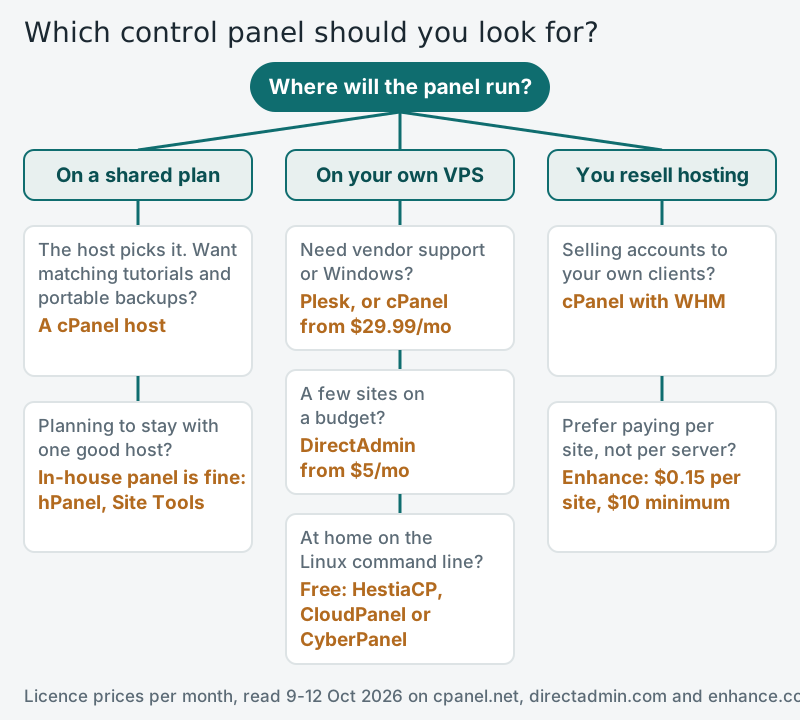
For a shared plan, treat the panel as a tie-breaker, not the deciding factor: the plan's limits, renewal price and backups matter more. Choose a cPanel host if you follow tutorials closely or expect to switch hosts, because the backups travel. For a VPS, start from how much of the server you want to run yourself. And if you resell hosting, price your plans with the licence in mind: at cPanel's current rates, every account above 100 adds $0.49 a month before you have earned anything from it.
Edge cases
- Windows applications: if your site needs ASP.NET or Microsoft SQL Server, Plesk is the practical option; cPanel does not run on Windows.
- WordPress-only sites: many managed WordPress hosts skip general-purpose panels for a dashboard of their own, and cPanel now sells WP Squared at $84.99 a month for 10 WordPress sites plus $0.40 for each extra one.
- Licence costs inside your plan: on reseller hosting, the cPanel fee is built into the price per account, so a plan that caps cPanel accounts is passing on the licence model.
- Low-memory servers: Plesk lists 1 GB of RAM plus 1 GB of swap as the minimum for its Linux edition and 2 GB for Windows, so the smallest VPS plans may not fit a full panel.
For the wider picture of how panels, servers and plans fit together, see what web hosting is and our web hosting glossary.
Control panels: quick answers
What is the best alternative to cPanel?
Is there a free cPanel alternative?
Why did cPanel get so expensive?
Is Plesk better than cPanel?
Does the control panel matter on shared hosting?
New to this? Start with the basics — what web hosting is, explained — then see the types of web hosting compared side by side.