How to Find Out Who Hosts a Website (4 Methods That Work in 2026)
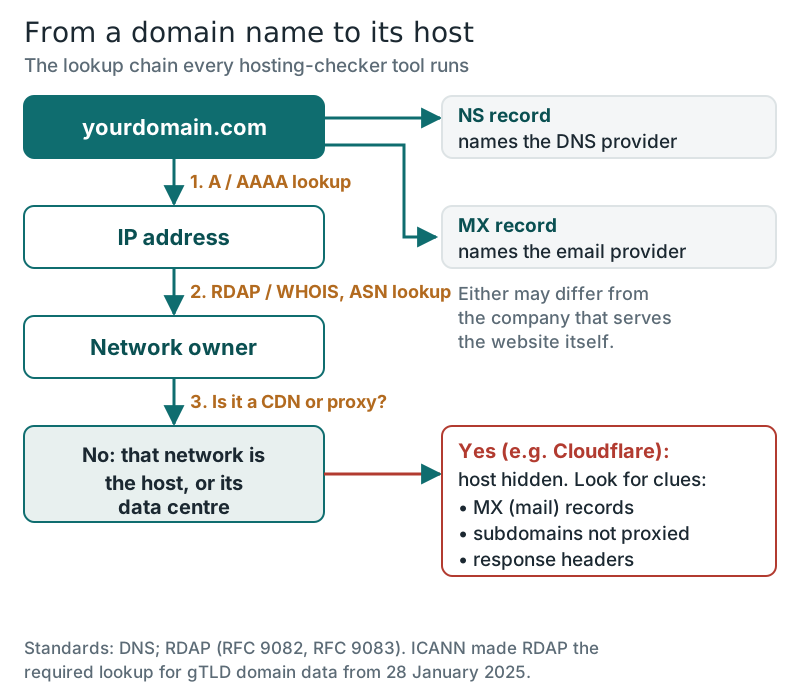
To find out who hosts a website, look up the IP address its domain points to, then look up who owns that IP address. The organisation that owns the address block is the hosting company, or the data centre it rents space from. Every "who is hosting this" tool runs those two lookups for you, and you can run them yourself in under a minute with free commands or a browser. The answer is hidden only when the site sits behind a CDN or proxy such as Cloudflare, and even then the domain's other records often give it away.
This guide teaches the method rather than pointing you at one lookup site, so you can check a tool's answer, recognise when it is wrong and work out the host of your own site when you have lost track of it. All the example lookups below were run on 12 October 2026.
The fastest way: two lookups
Here is the whole method on a real site. Asking DNS for the address of wikipedia.org returned 185.15.59.224 from where we ran it. Looking that address up in the registry data showed a network named Wikimedia-esams-infra, registered through RIPE NCC, the registry for Europe and the Middle East, and an autonomous system lookup put it in AS14907, "WIKIMEDIA - Wikimedia Foundation Inc." So Wikipedia hosts itself, on its own network. Most sites resolve to a hosting company, not to their own organisation, but the two steps are the same.
A large site may give different visitors different addresses, because it answers from whichever location is nearest. You may see another IP for wikipedia.org than we did; it will still belong to the same organisation, which is the part that matters.
Method 1: look up the domain's IP address
Every website's domain has DNS records, and the A record (for IPv4) or AAAA record (for IPv6) holds the address of the server that answers for it. You can read it three ways:
- On a Mac or Linux terminal: run dig +short example.com, or host example.com.
- On Windows: run nslookup example.com in Command Prompt or PowerShell.
- In a browser: any free DNS lookup website will show the A and AAAA records for a name you type in.
If you get several addresses, that is normal; large sites spread traffic across servers. Check the www version of the name too, because it can point somewhere different from the bare domain. Our explainer on how web hosting works covers what happens between this DNS answer and the page appearing.
Method 2: look up who owns the IP address
IP addresses are handed out by five regional internet registries, and each publishes who holds every block it has allocated. The modern way to ask is RDAP, the Registration Data Access Protocol, whose queries and JSON answers are defined in RFC 9082 and RFC 9083. The free bootstrap service at rdap.org forwards a query to whichever registry holds the address, which saves you working out the region first. The older whois command still works for IP addresses too.
The registry record names the organisation and gives an abuse contact. A second lookup, by autonomous system number (ASN), tells you which network actually announces that address on the internet, which is often a cleaner name. On a terminal, Team Cymru's free service does it in one line: whois -h whois.cymru.com " -v 185.15.59.224" returns the AS number, the registry, the allocation date and the network name.
Do not confuse this with a domain WHOIS lookup. A domain's registration record names the registrar where the name was bought, which is often not the company hosting the site. ICANN has made RDAP the required way to publish that domain data: since 28 January 2025, registries and registrars for generic top-level domains no longer have to offer WHOIS, except for .com, .name and .post, but must offer RDAP. Our guide to domain vs hosting explains why the registrar and the host are separate businesses.
Method 3: nameservers, mail records and reverse DNS
Three more DNS lookups add context, though none is conclusive alone:
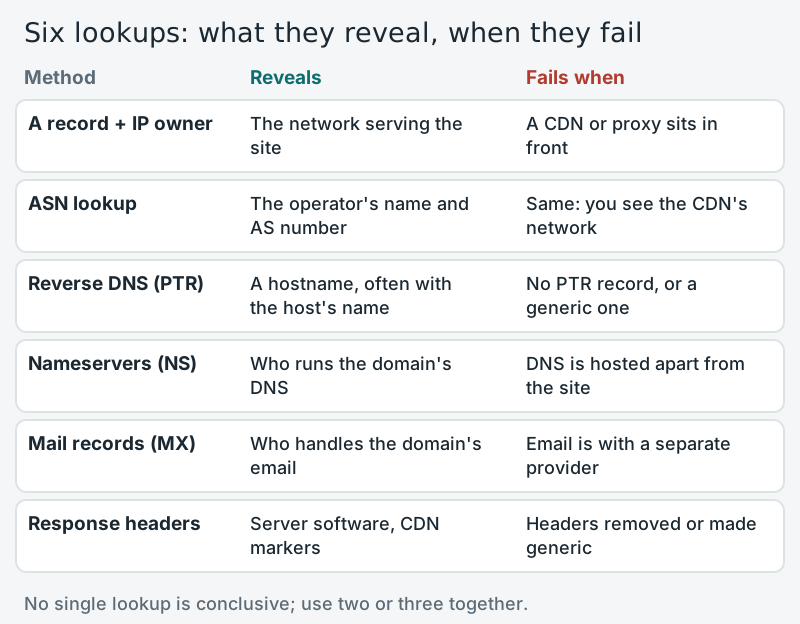
- Nameservers (NS): they show who runs the domain's DNS. Many hosts set their own nameservers for customers, so a name like ns1.somehost.com is a strong hint, but DNS is often hosted elsewhere. Wikipedia's are ns0, ns1 and ns2.wikimedia.org.
- Mail records (MX): they show who handles the domain's email. Wikipedia's point to mx-in1001 and mx-in2001.wikimedia.org. Plenty of businesses host email with one company and the website with another, so treat this as a clue, not an answer.
- Reverse DNS (PTR): asking which name belongs to an IP address sometimes returns a hostname that includes the host's own domain. For 185.15.59.224 it returned text-lb.esams.wikimedia.org.
A fourth check needs no DNS at all. Fetching a page's response headers, with curl -sI https://example.com on a terminal or the network panel in your browser's developer tools, shows the server software and any CDN markers. Wikipedia's headers named Apache Traffic Server and showed its own cache status.
When Cloudflare hides the real host
Many sites put a CDN or reverse proxy in front of their host for speed and security, and then every lookup above describes the proxy instead. The reserved demonstration domain example.com shows exactly what that looks like. On 12 October 2026 it resolved to 104.20.23.154 and 172.66.147.243. The ASN lookup for the first returned AS13335, CLOUDFLARENET, and the registry record named Cloudflare, Inc. Its nameservers were hera and elliott.ns.cloudflare.com, and its response headers included "server: cloudflare" and a cf-ray identifier, the clearest sign of all.
When you see that pattern, the honest answer is that the host is deliberately hidden. Some clues can still help:
- Records that are not proxied. Cloudflare only hides records set to proxied. Subdomains such as mail, ftp or a control-panel name are often left DNS-only and point straight at the hosting server.
- Mail records. Cloudflare's proxy handles web traffic, not email, so MX records point to a mail server that is not hidden, sometimes on the same machine as the website. example.com publishes a "null MX" record, meaning it accepts no email at all, so here that clue is a dead end.
- The page itself. Footer credits, a host's default error pages or a login path such as /cpanel sometimes reveal the platform.
If none of those work, no tool can tell you more, whatever its sales page claims. A lookup service that names a host behind Cloudflare is either reading historical records from before the proxy was added, or guessing.
Finding your own host
If the website is yours and you have simply forgotten where it lives, skip the detective work. Search your email for an invoice, a welcome message or a renewal reminder that mentions hosting; check your bank or card statement for a recurring charge; and log into your domain registrar to see which nameservers the domain uses. If the nameservers belong to a hosting company, that is almost certainly your host. If they belong to Cloudflare, log into Cloudflare and read the A record there: it points at your real server, and the IP owner lookup above will name the company.
Need a new host rather than an old one? Start with the types of web hosting to pick the right kind, or look at Hostinger's shared plans if all you need is somewhere affordable for a first site. And if you want the basics of what a host actually sells, read what web hosting is.
Edge cases
- Website builders: a site made with a hosted builder usually resolves to the builder's own network, because the builder is the host.
- Cloud platforms: an address owned by a large cloud provider tells you the infrastructure, not necessarily the company that manages the site on it.
- Shared hosting: many sites can share one IP address, so a reverse IP lookup listing other domains is normal and says nothing bad about the site.
- Recently moved sites: DNS answers can be cached for hours, so a lookup just after a move may still show the old host.
Finding a website's host: quick answers
How can I find out who hosts a website for free?
Are "who is hosting this" tools accurate?
Can I find the host of a site that uses Cloudflare?
Is the domain registrar the same as the web host?
How do I find out who my own web host is?
New to this? Start with the basics — what web hosting is, explained — then see the types of web hosting compared side by side.