Web Hosting Bandwidth and Storage, Explained: How Much Do You Need?
Bandwidth in web hosting is the amount of data your site sends to visitors in a month, and storage is the space your files take up on the server. To work out how much bandwidth you need, multiply monthly page views by the average weight of a page: 20,000 views of a 2 MB page is about 40 GB. At today's median page weights, a 100 GB allowance covers roughly 35,000 to 56,000 page views a month, so most first websites never come close.
This guide is for anyone comparing hosting plans who sees "100 GB bandwidth" or "unmetered" and wants to know what it means in visitors. If your site already runs on a host and has never hit a limit, you can skip the arithmetic and jump to the section on what "unlimited" really means. Figures below were read from vendor pages and the HTTP Archive on 9–10 October 2026.
What bandwidth means
In plain terms, bandwidth on a hosting plan is a monthly allowance of data transfer. Every time someone opens a page, the server sends the HTML, images, fonts, scripts and stylesheets that make it up, and the total of all those bytes across the month is your bandwidth use. Hosts use "bandwidth" and "data transfer" for the same thing, although engineers use bandwidth to mean the speed of a connection. On a plan sheet, it is nearly always a monthly quantity in gigabytes or terabytes, not a speed.
Most of the counted data is outbound: from your server to visitors. Some providers say so explicitly; DigitalOcean, for example, counts outbound transfer against a Droplet's allowance and does not charge for inbound traffic. Uploads by you or your visitors are usually small next to the pages you serve, so outbound is the number to estimate.
What storage means
Storage, or disk space, is the room your account takes on the server: site files, the database, images and video, email if the host keeps it on the same account, and any backups stored there. Entry plans now list it in tens of gigabytes. Hostinger's Single plan lists 10 GB and Premium 20 GB, SiteGround's StartUp lists 10 GB, and Kinsta's Single 20GB plan includes 10 GB of storage, per each host's own pages read on 9–10 October 2026. A text-and-photos site fits in a small fraction of that.
The storage limit that catches people is rarely gigabytes. It is the file count, called an inode limit. Hostinger publishes 200,000 inodes on Single and 400,000 on Premium, and HostGator's terms say an account above 200,000 inodes may be asked to reduce. Thousands of small cache files, image thumbnails and old backups can reach that ceiling while the disk is still mostly empty.
The formula: visitors × pages × page weight
Monthly data transfer is three numbers multiplied together: monthly visits, pages viewed per visit, and the average weight of a page. If your analytics tool reports page views directly, you can skip the first two and use page views × page weight. The weight of a page is everything the browser downloads to show it, which your browser's developer tools display at the bottom of the Network tab.
If you don't know your page weight yet, use a published median. The HTTP Archive's Web Almanac 2025 page-weight chapter, built from a July 2025 crawl, puts the median home page at 2,559 KB on mobile and 2,862 KB on desktop, and the median inner page at 1,769 KB on mobile and 1,963 KB on desktop. Home pages are heavier because they carry hero images and more scripts, so a site whose visitors read several articles per visit averages closer to the inner-page figure.
Two adjustments keep the estimate honest. Returning visitors download less, because their browser has cached the fonts, stylesheets and logo from an earlier visit, so the formula overestimates a site with loyal readers. Automated traffic pushes the other way: search crawlers, AI crawlers, uptime monitors and scrapers all fetch pages, and none of them appear in a typical analytics dashboard.
Lookup table: what 10 GB, 100 GB and 1 TB support
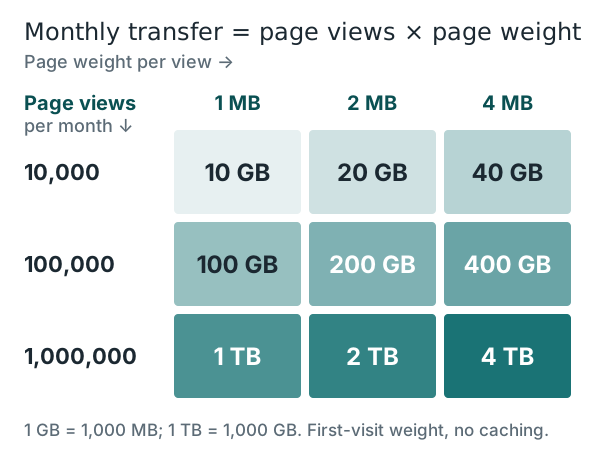
Read the grid from your traffic row to your page-weight column. A small business site with 10,000 page views a month needs between 10 and 40 GB of monthly transfer, depending on how heavy its pages are. A blog at 100,000 views needs 100 to 400 GB. A million monthly views on 2 MB pages is about 2 TB, which is when transfer starts to dominate the hosting bill on platforms that charge by the gigabyte.
Turned the other way round, an allowance tells you a visitor count. That is the question behind the search "100 GB bandwidth": how much traffic is it?
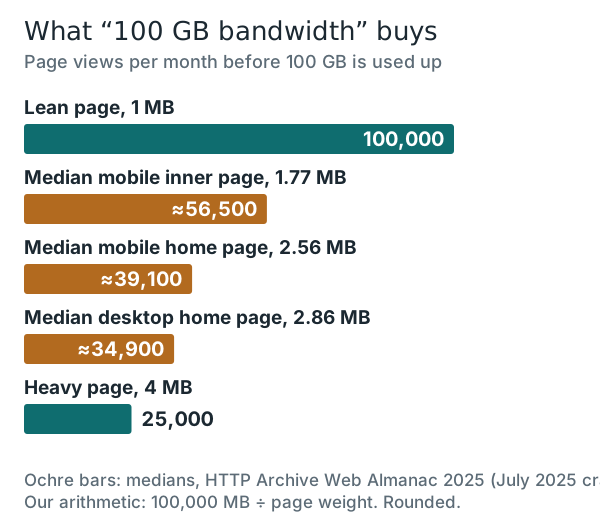
A 100 GB monthly allowance covers about 56,500 views of a median mobile inner page and about 39,100 views of a median mobile home page. Trim a page to 1 MB and the same allowance stretches to 100,000 views. Let it grow to 4 MB and it drops to 25,000. Page weight moves the answer by a factor of four, which is why the cheapest bandwidth upgrade is usually image compression.
For context, Hostinger's own limits page lists 100 GB of bandwidth on its Single plan and unlimited bandwidth on Premium. A brochure site or a new blog sits comfortably inside 100 GB; a site with a few hundred thousand monthly views does not.
How much bandwidth do you actually need?
Start from your real traffic, or a realistic guess for the first year, and add headroom of about half again for crawlers, spikes and growth. Then compare that number with the plan's allowance and with what happens when you exceed it. For most first websites the answer is that bandwidth does not decide the plan at all; CPU time, memory and the number of sites allowed do, as covered in what web hosting is.
If your arithmetic lands well under 100 GB, an ordinary shared plan is enough, and the allowance is not worth paying extra for. Hostinger states its Single plan's 100 GB figure outright, which makes it easy to check your estimate against. SiteGround calls its traffic unmetered only while a plan's CPU and other resource limits are not reached, and its StartUp plan costs $2.99 a month prepaid for 12 months, then renews at $17.99 a month, per its web hosting page read on 10 October 2026. Bluehost says in its terms that it does not set arbitrary limits on visitor traffic but may limit processor time, processes and memory. Whichever you pick, compare the renewal price, not only the first-term price.
Web hosting bandwidth cost: what an extra gigabyte costs
Shared hosting rarely bills by the gigabyte; it caps resources instead. Cloud servers and premium managed WordPress hosts do publish a per-gigabyte rate once you pass an allowance, and those rates differ by a factor of fifty.
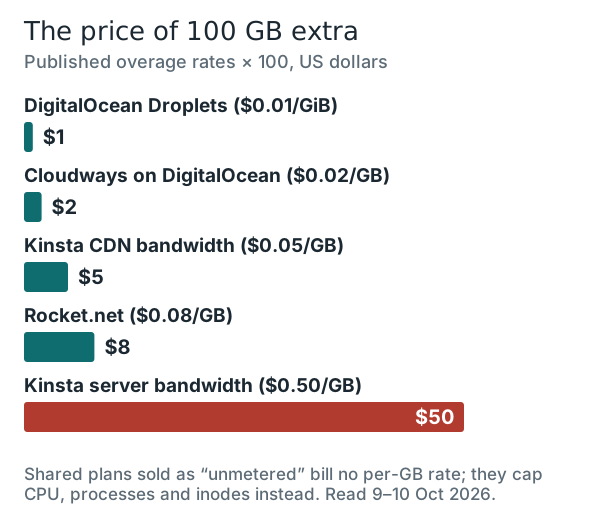
| Host and plan | Included transfer | Price beyond it | Note |
|---|---|---|---|
| DigitalOcean Basic Droplet, $4/mo | 500 GiB | $0.01 per GiB | Allowance pooled across a team's Droplets; inbound free |
| DigitalOcean Basic Droplet, $6/mo | 1,000 GiB | $0.01 per GiB | Same pooling rule |
| Cloudways on DigitalOcean | Varies by server | $0.02 per GB | Cloudways' Flexible pricing page |
| Kinsta Single 20GB, $35/mo | 20 GB server + 125 GB CDN | $0.50/GB server; $0.05/GB CDN | Billed with the plan at month end |
| Rocket.net Starter, $30/mo | 50 GB | $0.08 per GB | Monthly price; annual billing is lower |
| AWS (EC2 and other services) | 100 GB/month free | Tiered rates | Free tier aggregated across services |
Two unit traps sit in that table. DigitalOcean quotes gibibytes, and one GiB is about 1.074 GB, so its 1,000 GiB allowance is roughly 1,074 GB. Kinsta splits transfer into server bandwidth and CDN bandwidth: bytes served from its CDN edge are billed at a tenth of the rate of bytes served by the server itself, which is a strong reason to let the CDN carry images.
What "unlimited" and "unmetered" really mean
"Unmetered" means the host does not count gigabytes for billing; it does not mean the server has infinite capacity. Every unmetered plan sits under an acceptable-use policy and under resource caps that throttle a busy site long before transfer becomes a problem. SiteGround's fair-use page, for example, gives StartUp 1,000 CPU seconds an hour and 200,000 inodes, GrowBig 2,000 and 400,000, and GoGeek 4,000 and 600,000.
Hostinger's hosting agreement measures "unlimited" against what a typical small business site would use, and DreamHost's resource policy says unmetered bandwidth may be temporarily limited. In practice a site that needs more traffic than its unmetered shared plan can serve hits the CPU limit first and slows down, which is the moment to look at shared vs VPS vs cloud vs dedicated rather than at a bigger bandwidth number.
How a CDN changes the math
In plain terms, a CDN is a network of servers spread around the world that hold copies of your static files close to visitors, so a cached image is sent by the CDN rather than by your host. Transfer still happens, but it is counted against the CDN, not your hosting plan. On a plan with a per-gigabyte overage that changes the bill directly; on an unmetered plan it frees CPU time instead.
How much moves to the CDN depends on what your pages are made of. Images, fonts, scripts and stylesheets cache well; the HTML of a logged-in dashboard or a shopping cart does not. Cloudflare's Pages product, as one example, serves static-asset requests free and without a cap on both free and paid plans, so a fully static site can push almost all of its transfer off a metered server.
How to use less of both
The fastest way to need less bandwidth is to send fewer bytes per page. Serve images at the size they display, in WebP or AVIF, and compress them; images are the largest part of a typical page. Remove scripts and fonts you don't use, and set long cache lifetimes for files that rarely change so returning visitors don't download them again.
For storage, look at what accumulates rather than what you publish. Old backups kept on the account, unused media library uploads and abandoned staging copies use space and inodes. Move large video to a video platform and keep backups off the hosting account, and a small plan will carry a far larger site than its headline figures suggest.
Edge cases the averages miss
- Downloads and media. A 50 MB PDF or podcast file downloaded 2,000 times is 100 GB on its own, more than thousands of ordinary page views.
- A viral day. Monthly allowances absorb a spike only if the rest of the month is quiet; on per-gigabyte billing, a single day can set the month's bill.
- Bots you never see. Crawlers and monitoring tools fetch pages without appearing in analytics, so server logs show more transfer than your traffic report suggests.
- Hotlinking. Another site embedding your images makes your server send them to its visitors; a CDN or hotlink protection stops it.
- GB vs GiB. Allowances in gibibytes are about 7% larger than the same number in gigabytes.
None of these need special planning on a small site, but each one explains a month where usage jumps without any change in visitors. If that happens, the host's raw access log or its analytics panel will show which files were requested most, and the answer is usually one large file or one aggressive crawler.
Bandwidth and storage: quick answers
What is bandwidth in web hosting?
How much is 100 GB of bandwidth?
How much bandwidth do I need for web hosting?
What does unlimited bandwidth mean in web hosting?
What is the difference between bandwidth and storage?
New to this? Start with the basics — what web hosting is, explained — then see the types of web hosting compared side by side.