Pros and Cons of Shared Hosting: How One Server Is Split Between Many Sites
The pros and cons of shared hosting come from one design choice: many hosting accounts live on the same server and draw on the same processors, memory and disks. That makes it the cheapest way to put a site online, with the entry plans compared below costing $2.89 to $3.99 a month on their intro terms, and the host runs the server for you. The cost is a capped slice of resources, a server you cannot customise, and a renewal price that runs roughly 2.5 to 6 times the intro rate.
Shared hosting is the right starting point for a blog, a portfolio, a brochure site for a local business or a small shop taking a few orders a day. It is the wrong choice for a site with heavy or spiky traffic, an app that needs software the host does not install, or a store planning big sales. The rest of this guide shows how the sharing actually works, using the limits hosts set on each account, so you can tell which side of that line your site is on. Prices come from the hosts' US plan pages, as they stood on 9 and 10 October 2026.
Shared hosting in one paragraph
Shared web hosting is a service where a hosting company runs one server, installs one operating system and one set of web server software on it, and divides it into many separate customer accounts. Each account gets its own login, its own folder of files, its own databases and usually its own email, all managed through a control panel such as cPanel. You never see the other accounts, and they never see yours, but every page any of you serves is computed by the same machine. That is the whole difference from a VPS or a dedicated server: on shared hosting, the server is a commons, and the host's job is to keep any one account from using more than its share. Our guide to what a web server is covers the machine itself. If hosting in general is new to you, begin with what web hosting is.
How one server is divided between accounts
Hosts used to rely on simple disk quotas and goodwill, which is how the phrase "noisy neighbour" entered hosting vocabulary: one busy site could slow the whole server. Most shared platforms now enforce hard per-account limits at the operating-system level. One common way to do it is CloudLinux OS, whose documentation describes its Lightweight Virtual Environment (LVE) as kernel-level technology, related to container virtualisation and built on cgroups, with one stated goal: that no single website can bring down the server.
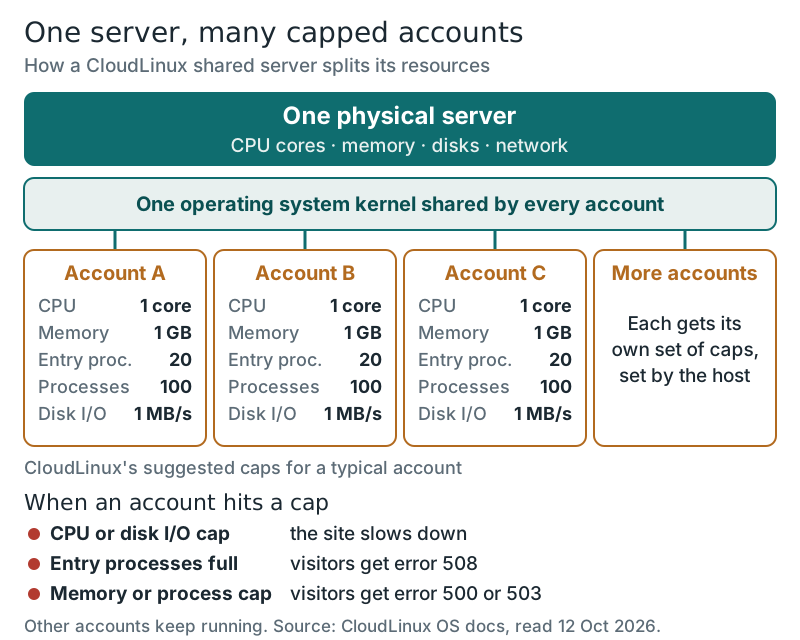
Each account's environment carries a set of named limits. These are the ones you will see in a control panel's resource-usage page or in a host's "you have reached your limits" email:
- SPEED (CPU): a percentage of one processor core. 100% means the account can use, at most, one full core at once.
- PMEM (physical memory): how much RAM the account's processes can hold. CloudLinux counts shared memory and disk cache against it.
- EP (entry processes): how many requests to dynamic scripts, such as PHP pages, can run for the account at the same moment, along with SSH sessions and cron jobs.
- NPROC (processes): the total number of processes the account may run, including ones started by those entry processes.
- IO and IOPS: disk throughput in kilobytes per second, and disk operations per second.
- Inodes: the number of files and folders the account may hold, whatever their size.
CloudLinux publishes suggested values for a typical hosting account: one core, 1 GB of physical memory, 1,024 KB per second of disk throughput, 1,024 disk operations per second, 100 processes and 20 entry processes. Its "high end" suggestion doubles the CPU and memory and raises entry processes to 40. Hosts set their own numbers, but those figures give a realistic sense of the slice a cheap plan buys.
What happens at a limit depends on which one you hit, and the documentation is specific. A site held back by CPU or disk speed simply responds more slowly. A site that runs out of entry processes starts returning error 508 to new visitors until a slot frees up. A site that hits the memory or process ceiling returns 500 or 503 errors. In every case the other accounts on the server keep running normally, which is the point of the design. If your own site shows any of those errors at busy moments, the limits are the first thing to check.
What hosts actually publish per account
Here is the awkward part for buyers: only some hosts tell you the numbers before you pay. The table collects what each host states on its plan pages, knowledge base or terms. "Not published" means we found no figure, not that no limit exists; every shared host caps resources somehow.
| Host and plan | CPU | Memory | Concurrency | Files (inodes) | Price |
|---|---|---|---|---|---|
| Hostinger Premium | 1 core | 2 GB | 40 PHP workers | 400,000 | $2.99 on 48 months, renews $10.99 |
| Hostinger Unlimited | 2 cores | 3 GB | 60 PHP workers | 600,000 | $3.99 on 48 months, renews $16.99 |
| SiteGround StartUp | 1,000 CPU seconds an hour | Not published | Not published | 200,000 | $2.99 for 12 months, renews $17.99 |
| SiteGround GrowBig | 2,000 CPU seconds an hour | Not published | Not published | 400,000 | $4.99 for 12 months, renews $29.99 |
| Hosting.com Starter | 2 vCPU | 2 GB | 30 concurrent visitors | 200,000 | Not readable on the page |
| HostGator Hatchling | Not published | Not published | Not published | Asked to reduce above 200,000 | $3.75 on 36 months, renews $10.99 |
| Bluehost Starter | No figure in terms | No figure in terms | No figure in terms | No backups above 50,000 files | $3.99 on 36 months, renews $9.99 |
| DreamHost Launch | No figure in policy | No figure in policy | No figure in policy | Metered, no number given | $2.89 for 12 months, renews $10.99 |
| GreenGeeks Lite | Allocated, not published | Allocated, not published | Not published | Allocated, not published | $2.95 for 12 months, renews $13.95 |
Two patterns stand out. Hostinger and Hosting.com publish limits close to the CloudLinux vocabulary, so you can compare a plan's slice with your site's needs. SiteGround measures CPU time instead: 1,000 CPU seconds an hour on StartUp is roughly a quarter of one core used continuously, though most sites use CPU in short bursts. The others describe their limits in policy language, which means you learn your plan's ceiling when you reach it. Inode limits deserve attention on every plan, because caching plugins, image thumbnails and backups stored on the account multiply file counts quickly; our page on bandwidth and storage shows how storage fills up.
The noisy neighbour today, and what is still shared
Per-account limits largely fixed the old problem of one site starving everyone else of CPU. They did not make shared hosting the same as having your own server. Several things are still common to every account on the machine:
- The IP address. Many accounts can share one IP address, so a neighbour that sends spam can hurt the reputation of email sent from that address.
- The software versions. You choose from the PHP and database versions the host installs; you cannot add system packages yourself.
- Server-wide events. A hardware fault, a kernel update or an attack aimed at the server affects every account on it at once.
- The total pool. Caps stop one account taking everything, but if the host places too many accounts on a server, all of them can be within their limits and still compete for the same disks.
For a small site, none of these rules shared hosting out. They are the reasons a growing site eventually moves to a VPS, where the resources are reserved rather than capped. Our comparison of shared, VPS, cloud and dedicated hosting walks through that next step.
Pros and cons of shared hosting
Pros
- Lowest price of any hosting type. Entry plans start under $4 a month on their intro terms, with the domain, SSL certificate and email often included in year one.
- The host runs the server. Operating-system updates, security patches, hardware and backups are its job, not yours.
- Beginner-friendly tools. A control panel, one-click WordPress installs and support that will answer basic questions.
- Enough for most small sites. A typical blog or business site uses a fraction of even a basic account's CPU and memory caps.
- Isolation is real. With per-account limits, a neighbour's traffic spike no longer takes your site down with it.
Cons
- Hard ceilings. When you hit the CPU, memory or entry-process limit, visitors see slow pages or errors, often at your busiest moment.
- Limits are often unpublished. Several big hosts give no numbers, so you cannot size a plan before buying.
- The renewal jump. Year-two prices run from about 2.5 to 6 times the intro price, as the chart below shows.
- Little control. No root access, a fixed menu of software versions, and shared IP reputation.
- Long prepaid terms. The lowest intro prices require 12 to 48 months paid up front.
Who shared hosting is right for, and the renewal caveat
Shared hosting suits a site whose traffic you can describe in thousands of visits a month rather than hundreds of thousands, built on mainstream software such as WordPress, and run by someone who would rather not manage a server. That covers most first websites. It is also a sensible place to test an idea before you know whether it will need more.
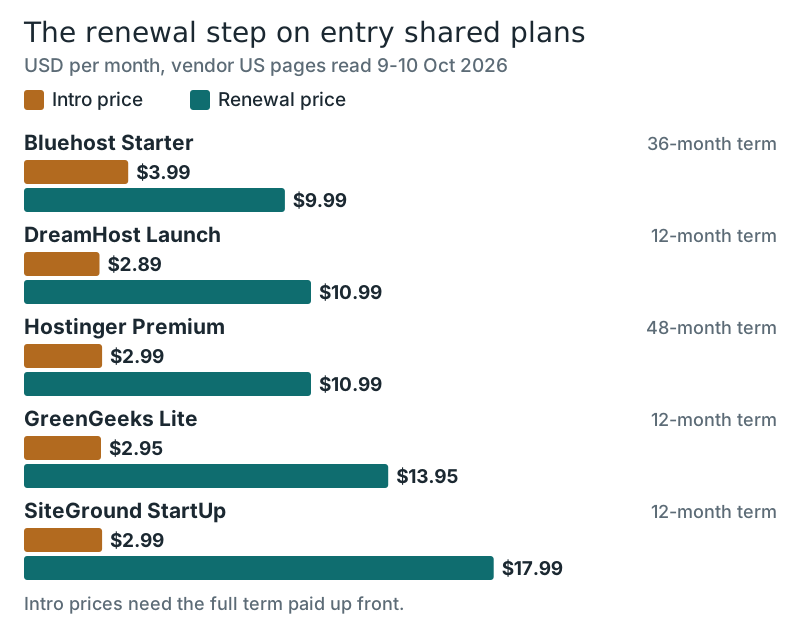
Budget for the renewal, not the intro price. The plans in the chart renew at $9.99 to $17.99 a month, and the term matters as much as the rate: Hostinger's $2.99 covers four years, while SiteGround's and GreenGeeks' intro prices last one. Over four years, Hostinger Premium costs $143.52 in a single payment, while SiteGround StartUp costs $35.88 for year one and then $647.64 for the next three years at its renewal rate. If a long, cheap term suits you, Hostinger's shared plans lock in the longest intro period; if you want 30 days of daily backups and published CPU limits, SiteGround's plans cost more after year one but tell you exactly what you are buying.
Most shared plans run Linux, which is what PHP, MySQL and WordPress are built for, and it is what "Linux shared web hosting" in a plan name refers to. You only need a Windows shared plan if your site is built on Microsoft technologies such as ASP.NET. When comparing shared web hosting services, check five things in this order: the renewal price and term, the published limits (or the lack of them), backup frequency and retention, whether staging is included, and the refund window.
Edge cases
- A WooCommerce store: checkout pages cannot be cached, so each one uses an entry process; a store with several shoppers paying at once reaches a 20-process limit far sooner than a blog.
- Many small sites on one plan: "unlimited websites" share one account's caps, so ten quiet sites can add up to one busy one.
- Large media libraries: inode limits bite before disk space does when a site stores tens of thousands of small images.
- Email-heavy businesses: shared IP reputation affects deliverability; a dedicated email provider avoids the problem.
If more than one of these describes your site, read up on managed hosting and the other types of web hosting before you buy, because a plan with reserved resources will save you a migration later.
Shared hosting: quick answers
What is shared web hosting?
What are the disadvantages of shared hosting?
Is shared hosting good enough for WordPress?
Is shared hosting secure?
When should I move off shared hosting?
New to this? Start with the basics — what web hosting is, explained — then see the types of web hosting compared side by side.